Robot vacuum battery life is a crucial consideration for consumers seeking efficient and convenient home cleaning solutions. The runtime of a robot vacuum directly impacts its ability to clean an entire floor, its frequency of returning to the charging dock, and the overall user experience. This article aims to provide a comprehensive comparison of robot vacuum battery life, examining various factors that influence it and highlighting models that demonstrate superior endurance.
Several elements contribute to how long a robot vacuum can operate on a single charge. Understanding these nuances is essential for making an informed purchase decision.
Battery Capacity and Type
The fundamental determinant of battery life is its capacity, typically measured in milliampere-hours (mAh) or watt-hours (Wh). Higher capacity generally translates to longer runtime. However, the type of battery technology also plays a significant role.
Lithium-Ion (Li-ion) Batteries
Lithium-ion batteries are the dominant technology in modern robot vacuums. They offer a good balance of energy density, longevity, and charge cycle performance.
Advantages of Li-ion
Li-ion batteries are lighter than older battery technologies and can hold a charge for extended periods when not in use. They also suffer from less “memory effect,” meaning they don’t need to be fully drained before recharging to maintain optimal performance. Their charge and discharge rates are also generally higher, allowing for quicker recharging cycles.
Disadvantages of Li-ion
Despite their advantages, Li-ion batteries can degrade over time, especially with frequent deep discharges or exposure to extreme temperatures. Replacing these batteries can also be an expense.
Nickel Metal Hydride (NiMH) Batteries
While less common in newer, higher-end models, NiMH batteries were prevalent in earlier robot vacuums.
Advantages of NiMH
NiMH batteries are generally more robust in terms of temperature tolerance compared to Li-ion. They also have a lower risk of thermal runaway.
Disadvantages of NiMH
NiMH batteries are heavier and have a lower energy density than Li-ion batteries, meaning a larger and heavier battery is required to achieve similar runtimes. They are also more susceptible to the memory effect, requiring users to follow specific charging protocols to ensure longevity.
Cleaning Mode and Intensity
The way a robot vacuum is used significantly impacts its battery consumption. Different cleaning modes and power settings utilize varying amounts of energy.
Standard/Auto Cleaning Modes
These modes are designed for general, everyday cleaning of moderate debris. They typically offer a balance between cleaning power and battery efficiency.
Consistent Suction Power
In standard modes, the vacuum’s suction motor operates at a consistent, moderate level. The brushes also spin at a standard speed, providing effective cleaning without excessive energy expenditure.
Boost/Deep Cleaning Modes
When faced with stubborn dirt, pet hair, or heavily soiled areas, many robot vacuums offer a “boost” or “deep cleaning” mode. This mode increases suction power and may alter brush speed to tackle tougher messes.
Increased Energy Draw
The elevated suction power and potentially faster brush rotation in these modes lead to a significantly higher energy draw from the battery. This, consequently, reduces the overall runtime.
Edge Cleaning and Spot Cleaning
Specific cleaning modes, such as edge cleaning or spot cleaning, also influence battery life.
Targeted Operation
Edge cleaning, for example, might involve precise movements and intensified suction along wall perimeters. Spot cleaning, conversely, focuses on a concentrated area, potentially leading to more frequent starts and stops, which can also impact efficiency.
Physical Obstacles and Floor Type
The environment in which a robot vacuum operates introduces variable resistance, directly affecting its motor strain and battery drain.
Carpet vs. Hardwood Floors
Changing floor surfaces is a primary factor in battery consumption.
Carpet Resistance
On carpets, the vacuum’s brushes have to work harder to agitate fibers and lift dirt. This increased resistance necessitates more powerful motor operation, leading to a quicker depletion of battery charge. Thicker or denser carpets will further exacerbate this effect.
Hardwood Efficiency
Hardwood, laminate, and tile floors offer less resistance, allowing the vacuum to move more freely. This generally results in longer runtimes compared to carpeted surfaces.
Obstacles and Navigation Complexity
The presence of furniture, rugs, toys, and other obstacles creates a more demanding cleaning task for the robot.
Increased Maneuvering
Navigating around furniture and avoiding obstacles requires the robot to make more turns, slow down, and potentially reverse. These constant adjustments in movement, coupled with sensor activation, contribute to increased energy usage.
Complex Layouts
Homes with intricate floor plans, numerous rooms, or frequent changes in elevation (like multiple small steps) can also reduce effective cleaning time per charge as the robot spends more time navigating and less time actively cleaning.
Maintenance of Cleaning Components
Simple maintenance can significantly impact a robot vacuum’s efficiency and, by extension, its battery life.
Brush Roll and Filter Condition
The state of the brush roll and filters directly affects airflow and the vacuum’s ability to pick up debris.
Clogged Filters and Tangled Brushes
When filters become clogged with dust and debris, or when the brush roll becomes entangled with hair and threads, the vacuum’s motor has to work harder to maintain suction and rotation. This increased strain on the motor leads to higher battery consumption. Regular cleaning or replacement of these components is vital.
Sensor Cleanliness
Robot vacuums rely on various sensors for navigation, obstacle detection, and cliff detection.
Dirty Sensors
Dust and grime accumulating on sensors can impair their functionality, leading to inefficient navigation, missed spots, or unnecessary re-cleaning. This can cause the robot to spend more time in operation, thus draining the battery faster.
If you’re interested in understanding how different robot vacuums perform in terms of battery life, you might find the article on battery life comparisons particularly insightful. It provides a detailed analysis of various models, highlighting their strengths and weaknesses. For more information, you can check out the article here: Battery Life Comparison of Robot Vacuums.
Comparative Analysis of Robot Vacuum Battery Life
Examining specific models and brands provides a clearer picture of the current landscape of robot vacuum battery performance.
Mid-Range Models: Balancing Performance and Price
Mid-range robot vacuums typically offer a respectable battery life suitable for many average-sized homes.
Common Battery Capacities and Runtimes
Models in this category often feature Li-ion batteries with capacities ranging from 2,600 mAh to 3,200 mAh.
Expected Runtime Hours
On a standard cleaning mode on hard floors, users can generally expect 90 to 120 minutes of runtime. On carpets, this can drop to 60 to 90 minutes, depending on carpet thickness and debris level.
Notable Models and Their Performance
Several mid-range models are recognized for their efficient battery management.
Example A: Consistent Performance
This model, known for its reliable navigation, often achieves its advertised runtime within its class. Its algorithms are optimized for efficient movement, minimizing unnecessary battery drain during navigation.
Example B: Stronger Battery for Lighter Cleaning
Another popular option in this segment boasts a slightly larger battery capacity, allowing for extended cleaning sessions, particularly on hard floors. However, its performance on thicker carpets may be comparable to other models in its price bracket.
High-End Models: Extended Runtimes and Advanced Features
Premium robot vacuums often come equipped with larger batteries and advanced power management systems to support their sophisticated features.
Larger Battery Capacities and Extended Lifespans
Many high-end models utilize batteries with capacities above 5,000 mAh, some even exceeding 6,000 mAh.
Runtimes Exceeding 150 Minutes
These larger batteries, when combined with efficient motor and navigation systems, can deliver runtimes of 150 minutes and often longer. Some models are even advertised with runtimes of up to 3 hours or more in specific modes.
Features Contributing to Extended Battery Life
Beyond sheer capacity, higher-end models often incorporate technologies that optimize battery usage.
Smart Navigation and Mapping
Advanced SLAM (Simultaneous Localization and Mapping) technology allows these robots to create detailed maps of a home, enabling more efficient cleaning paths and reducing time spent wandering.
Adaptive Suction Power
These vacuums can dynamically adjust suction power based on the floor type and the amount of debris detected, preventing excessive power draw on clean surfaces.
Top Performers in Battery Endurance
Certain high-end models stand out for their exceptional battery longevity.
Example C: The Marathon Runner
This model is frequently cited for its almost unparalleled runtime. Its large battery, coupled with exceptionally efficient software for path planning and obstacle avoidance, allows it to cover substantial areas without frequent recharges.
Example D: Powerhouse for Larger Homes
Another contender in the premium segment offers robust battery life, making it an excellent choice for larger residences with extensive floor plans. Its ability to maintain strong suction power even on carpets contributes to its overall effectiveness despite its extended operational capacity.
Budget-Friendly Options: Understanding Compromises
Entry-level robot vacuums generally offer shorter runtimes and may prioritize affordability over maximum battery endurance.
Smaller Battery Capacities and Shorter Durations
These models typically feature batteries in the 1,800 mAh to 2,600 mAh range.
Typical Runtime Expectations
On hard floors, expect around 60 to 90 minutes of cleaning. Runtimes on carpet can be significantly shorter, often in the 40 to 60-minute range.
Features Affecting Battery Life at This Tier
The simpler designs and less advanced navigation systems in budget models contribute to their shorter operational periods.
Basic Navigation Patterns
These vacuums often employ more random or less systematic navigation patterns, leading them to spend more time covering the same areas inefficiently, thus draining the battery faster.
Less Powerful Motors
While contributing to quieter operation and lower cost, less powerful motors may struggle more with debris and carpet, requiring them to work harder and thus drawing more power relative to their capacity.
Models Known for Their Budget-Friendly Approach
While exceptional battery life is not the primary focus, some budget models offer adequate performance for smaller spaces.
Example E: The Value Proposition
This model provides a basic cleaning solution at a very accessible price point. Its battery life is sufficient for cleaning a single room or a smaller apartment, but users with larger homes will likely find it insufficient for a complete clean without intermediate charging.
Impact of Battery Degradation and Replacement
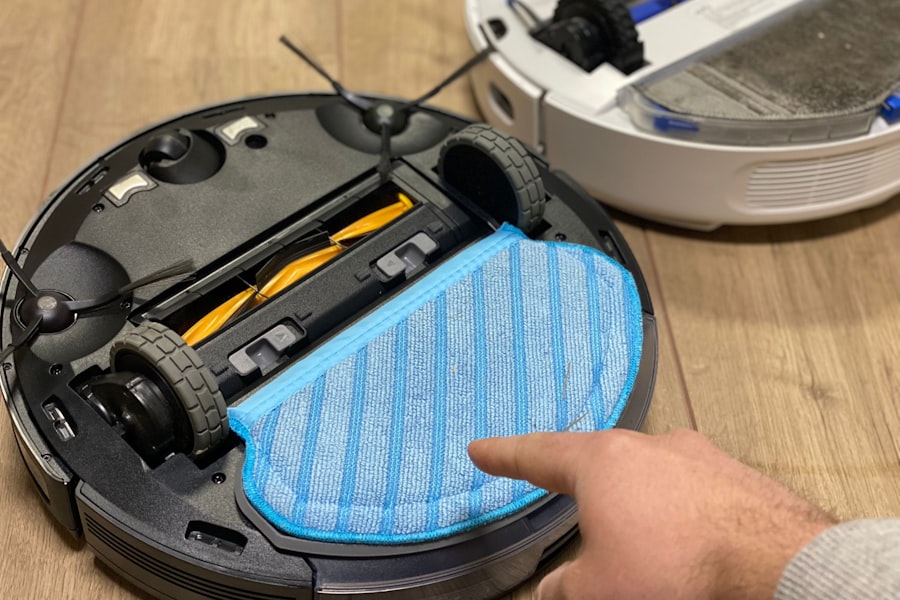
Over time, all rechargeable batteries degrade. This inevitable process affects robot vacuum performance and necessitates eventual replacement.
Lifespan of Robot Vacuum Batteries
The lifespan of a robot vacuum battery is measured in charge cycles and can vary based on usage patterns and battery technology.
Charge Cycle Estimates
Most Li-ion batteries in robot vacuums are rated for several hundred to over a thousand charge cycles before significant performance degradation occurs.
Factors Influencing Cycle Count
Frequent deep discharges, exposure to extreme temperatures, and inconsistent charging habits can shorten the effective lifespan of a battery.
Signs of Battery Degradation
Users can often observe a decline in their robot vacuum’s performance as its battery ages.
Reduced Runtime and Frequent Charging
The most obvious sign of battery degradation is a noticeable decrease in the vacuum’s operational time between charges. A robot that used to clean for an hour and a half might now only last 45 minutes. It will also likely return to its charging dock much more frequently.
Incomplete Cleaning Cycles
A weakening battery might not have enough power to complete an entire designated cleaning area, leading to unfinished tasks and a less satisfactory cleaning outcome.
Battery Replacement: When and How
Knowing when and how to replace a robot vacuum battery is crucial for maintaining its functionality.
Indicators for Replacement
When a robot vacuum consistently fails to complete its cleaning duties due to a depleted battery, or if its runtime is drastically reduced even after a full recharge, it’s a strong indicator that the battery needs replacement.
Considerations for DIY vs. Professional Replacement
Many robot vacuum batteries are designed for user replacement, often involving simple access panels. However, some models may require more technical expertise, and consulting the manufacturer’s guidelines or seeking professional assistance is advisable in such cases. The cost of replacement batteries can also be a factor.
Optimizing Battery Life for Your Robot Vacuum
Even with standard battery performance, several user-implemented strategies can help maximize a robot vacuum’s operational time and longevity.
Regular Maintenance and Cleaning
As previously discussed, diligent maintenance is paramount.
Cleaning Brushes, Filters, and Sensors
Consistently checking and cleaning the brush roll, replacing filters as recommended by the manufacturer, and ensuring sensors are free from dust will allow the vacuum to operate more efficiently, thereby conserving battery power.
Intelligent Scheduling and Usage
How and when a robot vacuum is deployed can also influence its battery performance.
Scheduling for Optimal Times
Running the vacuum during off-peak hours or when it’s less likely to encounter significant obstacles can indirectly benefit battery life by allowing for more consistent and less demanding cleaning cycles.
Avoiding Overlap in Cleaning Schedules
For homes with multiple cleaning zones or complex layouts, ensuring that cleaning schedules don’t unnecessarily overlap can prevent the robot from expending energy on areas already cleaned or that don’t require immediate attention.
Understanding Charging Habits
Proper charging techniques are essential for battery health.
Avoiding Overcharging and Deep Discharges
While modern Li-ion batteries are relatively forgiving, consistent overcharging or allowing the battery to drain completely too often can still contribute to degradation over the long term.
Utilizing Docking Station Features
Most robot vacuums automatically manage their charging when docked. Ensuring the docking station is placed in an accessible location with a clear path for the robot to return is crucial for ensuring it can maintain its charge effectively.
When considering the best robot vacuum for your home, battery life is a crucial factor that can significantly impact its performance. A recent article provides an insightful comparison of various models, highlighting their battery longevity and efficiency. For more detailed information on this topic, you can check out the article on robot vacuum battery life comparison at Hey Did You Know This. This resource can help you make an informed decision based on your specific cleaning needs.
Future Trends in Robot Vacuum Battery Technology
| Robot Vacuum Model | Battery Life (minutes) |
|---|---|
| iRobot Roomba 980 | 120 |
| Xiaomi Mi Robot Vacuum | 150 |
| Ecovacs Deebot N79S | 100 |
| Shark IQ Robot | 90 |
The relentless pursuit of innovation in the consumer electronics sector is also impacting robot vacuum battery performance.
Advancements in Battery Technology
Emerging battery technologies hold the promise of even longer runtimes and faster charging.
Solid-State Batteries
Solid-state batteries offer higher energy density, improved safety, and faster charging capabilities compared to current Li-ion technology. Their integration into robot vacuums could lead to significant increases in runtime.
Potential for Extended Operation
If successfully implemented, solid-state batteries could allow robot vacuums to operate for several hours on a single charge, making them suitable for even the largest homes without interruption.
Smarter Power Management Systems
Beyond battery hardware, intelligent software is playing an increasingly important role.
AI-Driven Efficiency Algorithms
Artificial intelligence is being used to develop more sophisticated algorithms that optimize cleaning paths, predict maintenance needs, and intelligently manage power consumption based on real-time environmental data.
Predictive Cleaning and Energy Allocation
AI could enable vacuums to learn user habits and home layouts to predict cleaning needs and allocate battery power more efficiently, ensuring that power is available when and where it’s most required.
Conclusion
The battery life of a robot vacuum is a multifaceted aspect influenced by a combination of battery capacity, cleaning mode, environmental factors, and user maintenance. While mid-range models offer adequate performance for many households, high-end units demonstrate superior endurance thanks to larger batteries and advanced technology. Budget-friendly options, while cost-effective, typically present shorter runtimes. Understanding the factors that affect battery life, practicing regular maintenance, and staying abreast of technological advancements will empower consumers to make informed decisions and maximize the utility of their robotic cleaning companions. The trend towards longer-lasting batteries and smarter power management systems indicates a future where robot vacuums can tackle even larger cleaning tasks with greater autonomy and efficiency.
FAQs
1. What is the average battery life of a robot vacuum?
The average battery life of a robot vacuum is typically between 60 to 120 minutes, depending on the model and brand.
2. Are there any robot vacuums with longer battery life than the average?
Yes, there are robot vacuums with longer battery life than the average. Some high-end models can run for up to 150 minutes on a single charge.
3. What factors can affect the battery life of a robot vacuum?
Factors that can affect the battery life of a robot vacuum include the suction power setting, the type of flooring being cleaned, the age and condition of the battery, and the size of the area being cleaned.
4. How long does it take for a robot vacuum to recharge its battery?
On average, it takes a robot vacuum between 2 to 4 hours to fully recharge its battery, depending on the model and brand.
5. Are there any tips for extending the battery life of a robot vacuum?
To extend the battery life of a robot vacuum, it is recommended to clean the dustbin and brushes regularly, keep the filter clean, and avoid running the vacuum on the highest suction power setting for extended periods of time.